If you have looked into access control in the UK, you have almost certainly come across Paxton. The company was founded in Brighton in 1985 and its systems are on doors in offices, schools, surgeries and blocks of flats right across the country. We are approved Paxton installers, and it is the brand we fit most often.
The catch is that Paxton makes several different systems, and the names do not always make it obvious which one you need. This guide explains each of them in plain English, from the point of view of someone who installs them for a living.
Why so many businesses choose Paxton
There are cheaper systems and there are more complex ones. Paxton sits in a sensible middle ground. The software is straightforward enough for an office manager to run, and the hardware is reliable. Paxton also offers a five year guarantee on its products, which tells you something about how long they expect it to last.
Paxton is sold only through trained installers, not direct to the public. That can feel like a downside, but it means the system you get should be designed and fitted properly, with someone local to support it.
Standalone: Compact and Switch2
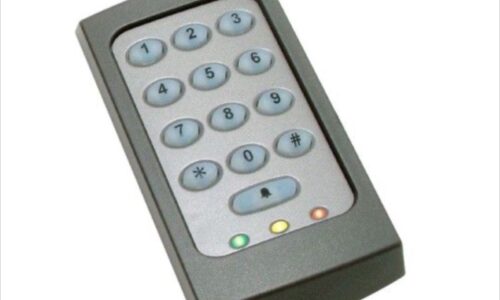
Paxton’s standalone range covers single doors that do not need any software. Each door stores its own users and is programmed at the door itself. You get keypad or fob access with no computer and no network.
It is the most affordable way into Paxton, and it suits a back door, a stock room or a small workshop. What you do not get is an audit trail or central management, so it is less suited to businesses with a lot of staff turnover.
Net2: the established choice
Net2 is Paxton’s networked access control system and still the one we install most. Every door controller links back to software on a PC, so you can add and remove users, set who can go where and when, and see a log of every door opening.
The software comes in two versions. Net2 Lite is free and covers what most sites need, while Net2 Pro adds features such as remote access through the Paxton Connect app, lockdown, timesheets and occupancy reports. According to Paxton, Net2 supports up to 1,000 doors and 50,000 users, so it comfortably covers anything from a small office to a large school.
Net2 also works with Paxton’s Entry video intercoms and PaxLock Pro wireless handles, and it can integrate with third party biometric readers if you need them.
Who Net2 suits
Offices, schools, surgeries, warehouses and any building that wants proven, PC based management with a clear audit trail.
Paxton10: access control and video together
Paxton10 is the newer platform. Instead of software on one PC, it is managed through a web browser from any device, and it combines access control with video management on the same system. Pull up a door event and you can see the footage from the camera watching it.
Paxton says the software is free with zero licence fees. A single Paxton10 server supports up to 1,000 doors, 1,000 cameras and 50,000 users, across as many as 100 sites. Staff can also use their phone or smartwatch as a key through the free Paxton Key app, without paying for each credential.
The hardware is a step up in price from Net2, so Paxton10 makes most sense where you are putting in new CCTV at the same time, managing more than one site, or want to administer the system from anywhere.
Who Paxton10 suits
Multi site businesses, growing organisations and anyone replacing access control and CCTV together.
Solo: phone based cloud access control
Solo is Paxton’s newest system, launched in the UK in April 2026. It takes a very different approach. There is no server, PC or on site network. Each door has a Solo Controller and a Solo DoorTag, which needs no power or wiring. Users tap their phone on the DoorTag, the phone checks with the cloud, and the controller releases the door.
The phone is both the key and the management tool. Solo uses the fingerprint or face unlock already on the user’s phone, so a lost phone cannot simply be picked up and used. Rather than a large upfront software cost, it runs on a low monthly subscription per door.
Solo is ideal for small offices, shops and light industrial units where everyone carries a smartphone. It is less suited to sites with lots of visitors, contractors or staff who do not want to use their own phone for work.
Who Solo suits
Small and medium sized businesses that want simple, app based control without any IT infrastructure.
PaxLock Pro: wireless door handles
PaxLock Pro puts the reader and lock inside a battery powered door handle. There is no cabling to the door, which makes it ideal for internal offices, meeting rooms and stores in finished buildings. Paxton certifies it for FD30 and FD60 fire doors, and it works with Net2, Paxton10 or on its own as a standalone lock.
Entry: video door entry
Entry is Paxton’s video intercom range. A panel at the entrance lets reception or residents see and speak to visitors before letting them in. Entry can work on its own, or alongside Net2 or Paxton10, so visitors and staff are managed through the same system. It is popular for schools, offices and blocks of flats.
Which Paxton system should you choose?
For a single door with a stable team, a standalone keypad or PaxLock Pro is usually enough. With several doors, regular staff changes and a need for an audit trail, Net2 remains the safe, sensible choice. If you want video on the same platform or are managing more than one site, look at Paxton10. And if you run a small site where everyone uses a smartphone, Solo is well worth a conversation.
Upgrading later is not a dead end either. Paxton supports a migration path from Net2 to Paxton10, and many Paxton readers, fobs and handles work across more than one system.
As approved Paxton installers based in Leicester, we design, install and maintain every system in the range. Call 0116 236 6044 or email info@accesscontrolsolutions.co.uk to book a site visit.
Frequently asked questions
What is the difference between Paxton Net2 and Paxton10?
Net2 is managed from software installed on a PC and focuses on access control. Paxton10 is managed through a web browser from any device and combines access control with video management on one platform. Both support up to 1,000 doors.
Is Paxton software free?
Net2 Lite is free, while Net2 Pro is a paid upgrade with extra features. Paxton10 software has zero licence fees. Solo runs on a monthly subscription per door. You still pay for the hardware and installation in every case.
Can I buy Paxton access control directly?
No. Paxton sells through trained and registered installers, who design, fit and support the system for you.
Can I use my phone with Paxton?
Yes. Paxton10 supports free smart credentials through the Paxton Key app on phones and smartwatches, and Solo is built entirely around phone access. Net2 Pro users can manage the system remotely through the Paxton Connect app.
Does Paxton work with fire doors?
Yes. PaxLock Pro is certified for FD30 and FD60 fire doors, and wired Paxton systems can be linked to a fire alarm so doors release automatically. Escape doors with electric locks also need a green or white break glass unit as an emergency release.
Can Paxton be added to an existing building?
Yes. Wired controllers suit most main entrances, and PaxLock Pro wireless handles fit many internal doors without new cabling, which keeps disruption to a minimum.
Posted in Access Control, Latest News